Anchor position tool
GeneratorClick through position-area values and watch where an anchored element lands around its anchor.
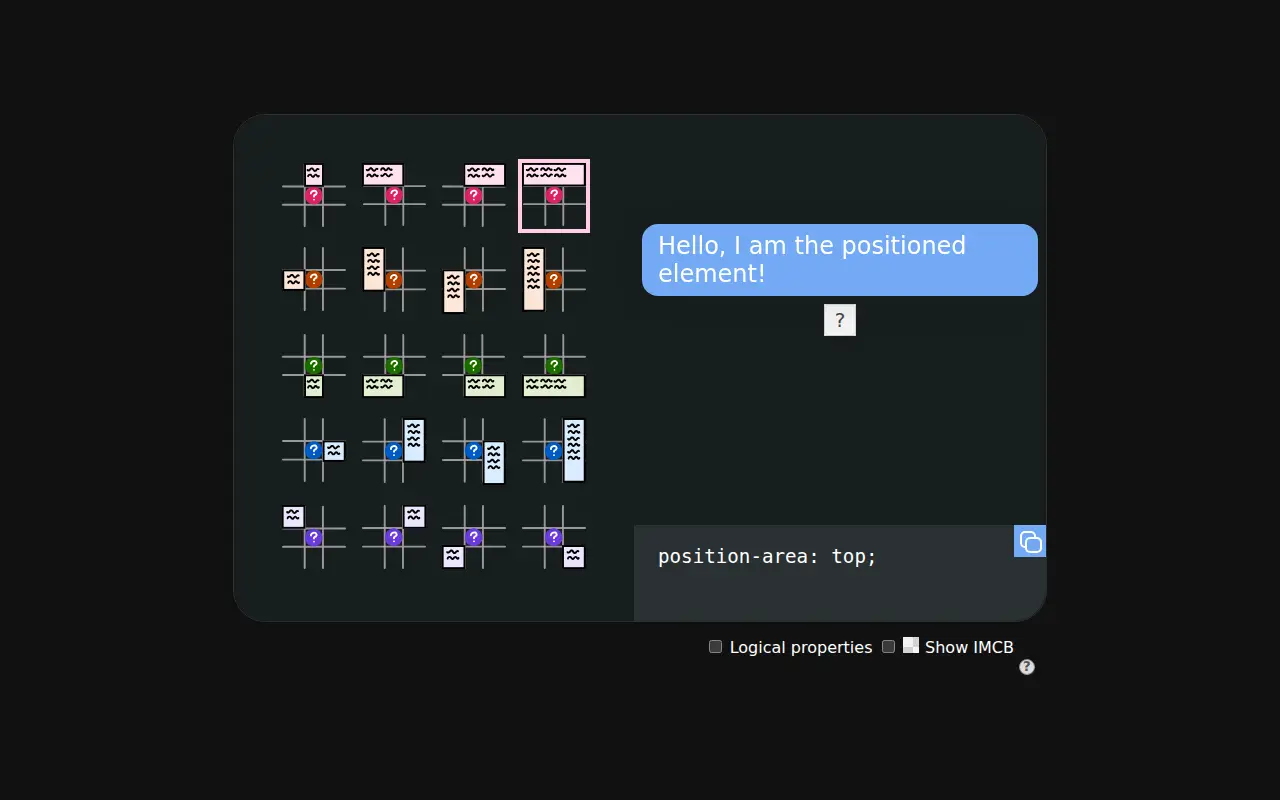
A small interactive demo for the position-area property in CSS anchor positioning. You click one of the position areas around an anchor and a tooltip moves there, with the matching position-area declaration shown for copying.
Toggles let you switch to logical values and show the inset-modified containing block, which helps you see why an element lands where it does.
It covers position-area only; it does not cover anchor(), position-try fallbacks or other parts of the spec. In browsers without anchor positioning, the page says it is for demonstration only.
Good for
- Pick the right position-area value for a tooltip or menu
- See the logical versions of each position-area keyword
- Visualise the inset-modified containing block
- Learn the position-area grid before writing anchor CSS by hand
anchor positioning
More generators
See all →scroll-driven-animations.style
GeneratorDemos plus visualisers that show how scroll() and view() timelines and their ranges map to an animation, with a free video course.- Price
- Free
- Made by
- Bramus Van Damme (Google Chrome DevRel)
- Kind
- Generator
Layoutit Grid
GeneratorDraw rows, columns and named areas visually and get the grid-template CSS and matching HTML.- Stars
- 1,745
- Last commit
- 5 years ago
- Licence
- MIT
Clippy
GeneratorDrag the points of a polygon, circle or inset shape over an image and copy the clip-path value.- Stars
- 944
- Last commit
- 2 years ago
- Licence
- Not stated